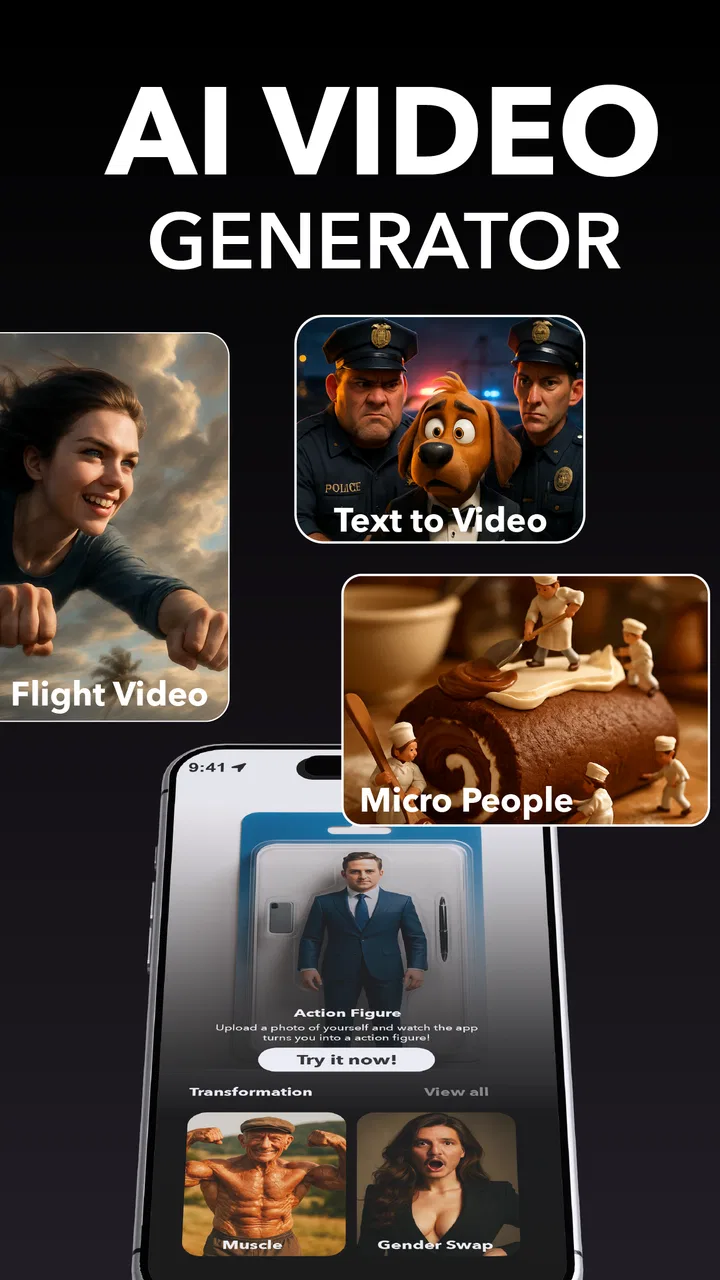
FaceTrix: AI Video Generator
- 4.1
- Rating
- 100.00K
- Installs
- Free
- Price

 Analysis by App-foxy
I tried FaceTrix as a lightweight way to turn ordinary photos into short, animated videos, and its appeal became clear almost immediately: it is aimed at people who want movement and visual effects without learning a full video editor. This is a photography app from Mobicraft, but I found myself using it more like a quick social-content tool. You start with an image, apply an AI animation or effect, and then judge whether the result feels lively enough to share.
That simple promise matters because many photo-to-video tools either become complicated very quickly or produce results that look too artificial. FaceTrix sits somewhere between those extremes. It is approachable for casual experiments, yet it rewards a little patience when choosing the source image and adjusting the presentation. My overall impression is positive, especially for users who want fast visual transformations rather than detailed control over every frame.
How the basic FaceTrix workflow feels in everyday use
The most sensible way to use FaceTrix is to begin with a photo that already has a clear subject. A well-lit portrait, a pet looking toward the camera, or a travel image with a strong foreground tends to give the animation a better starting point than a busy group picture. I found that the quality of the original image influences the result more than I first expected. A sharp face and uncluttered background give the effect room to work, while a crowded image can make the movement feel confused.
You May Also Like

 Blood Strike: 2.5 Anniversary
Blood Strike’s Loadouts Turn Every Drop Into a Tactical Gamble
A close look at Blood Strike’s custom loadouts: how fast access to signature weapons reshapes its battle royale rhythm, rewards preparation, and narrows the gap between fights.

 Pandora - Music & Podcasts
Pandora’s Music Is Easy to Start, but Harder to Recover
Pandora’s strength is its low-effort path from a seed to a station. Its weak spot is how much confidence it asks you to place in connection, setup, and quiet recovery.

 8 Ball Pool
 Is Built on Rivalries, Rematches, and Routine
A close look at the rivalries, rematches, shared routines, and unanswered safety questions that turn a quick pool match into a persistent mobile community.

 Samsung Music
’s Quiet Strength Is Playing What You Already Own
Its reach comes less from spectacle than from dependable access to a personal library. That simplicity is both the app’s strongest retention engine and its ceiling.

 AccuWeather: Weather Radar
AccuWeather Review: A Quick, Clear Forecast for Everyday Decisions
For everyday plans, the best forecast is the one you can understand quickly. AccuWeather makes rain timing, radar, and local conditions easy to act on, with a few trade-offs.

 Hill Climb Racing
Why Hill Climb Racing Still Turns Crashes Into One More Run
A tiny car, a bumpy hill and one more upgrade: Hill Climb Racing keeps resurfacing because its simple chaos makes every near-miss feel personal.
More From Our News Desk
View All News


The usual workflow is refreshingly short. I choose a photo, explore the available AI animation and visual-effect options, preview the transformation, and decide whether it is worth keeping. This makes the app useful when I have a single image I want to bring back into circulation. Instead of searching for an old video or building a slideshow manually, I can give that photo a new purpose in a few moments.
A realistic example is a birthday message. I might take a favorite portrait from my camera roll, apply a restrained animation, and use the result as a more personal greeting than a static image. The same approach works for a holiday memory, a small business post, or a before-and-after visual where motion helps draw attention. FaceTrix is strongest when the goal is a quick, eye-catching clip rather than a polished production with a carefully edited timeline.
The app is also easy to understand because its central idea stays visible throughout the experience. I never felt that I needed video-editing knowledge before trying it. That is important for someone who normally avoids editing apps because of tracks, layers, keyframes, and complicated export menus. FaceTrix removes much of that initial friction and lets the image remain the focus.
At the same time, I would not treat every generated result as ready to publish. AI animation can look convincing in one preview and awkward in another. Faces, hands, hair, reflective surfaces, and detailed backgrounds deserve a closer look before sharing. I learned to preview the whole result instead of judging it from the first moment, because an effect that starts attractively may become distracting later.
The app is free to install, which makes experimentation easy. It carries a Teen content rating, so families should still consider whether the style of AI-generated imagery fits the intended user. The current version is 1.9.0 and it runs on Android 8.0 or later, giving it a reasonably broad device range for people with older phones. Those details make it accessible, although the final experience can still depend on the phone’s performance and the complexity of the chosen effect.
Choosing photos that give the animation a fair chance
My first practical tip is to prepare a small selection of candidate images instead of committing to the first photo in the gallery. I look for a subject with enough separation from the background, a face that is not partly hidden, and lighting that does not create harsh shadows. This is not a guaranteed recipe, but it reduces the number of strange-looking attempts and makes the app feel much more consistent.
Portraits work naturally with FaceTrix, but I would not limit it to people. A close-up of a pet, a still image of a vehicle, or a landscape with a strong central object can also be interesting. The trade-off is that the more complex the scene, the more carefully I need to inspect the movement. When several objects compete for attention, the animation may not communicate the same clear idea as it does with one subject.
Experienced use also means keeping the original photograph untouched. I prefer creating a copy before experimenting, particularly when the image has sentimental value. That habit makes it easier to try a bolder effect without worrying about losing the source. It also lets me compare the original and animated versions side by side, which is useful when deciding whether the motion genuinely improves the image.
Settings and choices worth checking before saving
FaceTrix is not a traditional editor with the same level of manual adjustment I would expect from a dedicated video application. That is part of its appeal, but it also means the choice of effect carries a lot of weight. I pay attention to whether the animation supports the subject or simply adds movement for its own sake. A subtle treatment usually works better for a personal memory, while a more noticeable effect may suit a playful social post.
I also check the framing before I save anything. A photo that looks balanced in portrait orientation may feel cramped once it becomes a moving clip, especially if the main subject is close to an edge. If the original image contains important details near the borders, I take extra care with the preview. Cropping or presentation choices can change the emotional impact more than the animation itself.
Another useful habit is to compare several effects using the same photo. This creates a fairer test than changing both the image and the effect at once. I can then tell whether I prefer a particular animation style or whether the image itself is responsible for the stronger result. It also prevents me from mistaking novelty for quality: the most dramatic preview is not always the one I would want friends or customers to see.
Because the app includes in-app purchases ranging from $1.99 to $129.99 per item, I would review any purchase screen carefully before confirming an upgrade or extra content. For casual users, the free experience is the sensible place to begin. I would only consider paying after using the app enough to know which effects I actually need. The wide range between the lowest and highest listed item makes it especially important to understand what each purchase provides rather than assuming every option has the same value.
I also recommend checking the result after it has been saved, not only inside the preview. A clip can look fine in the app and feel different when viewed in the phone’s gallery or shared through another service. I use that final check to confirm that the subject remains readable and that the movement does not overpower the original photo. This small step is easy to skip, but it catches problems before a post goes public.
Repeatable patterns that make the app faster
The fastest workflow I found was to create a small “ready” folder of photos that are already cropped, clear, and suitable for animation. That avoids wasting time scrolling through hundreds of images whenever I want to make something. I do not need a special collection inside the app; a normal phone album is enough. The benefit comes from separating photo selection from effect selection, so each task stays focused.
For regular posting, I would use a repeatable sequence: choose the subject, test a restrained effect first, preview the entire clip, then try a stronger option only if the first one feels too quiet. This gives me a baseline and prevents random tapping through effects. It is particularly useful for small business owners who want consistent visual posts without making every image look completely different.
FaceTrix also works well as a finishing step after ordinary photography. I might first take a clean portrait with the phone camera, correct the composition using the phone’s basic photo tools, and only then bring the image into FaceTrix. That division of labor is more effective than expecting the AI animation app to fix every weakness in the source. The camera or gallery editor handles brightness and cropping; FaceTrix handles the movement.
Another efficient pattern is to make one version for evaluation rather than generating many versions immediately. I preview the most suitable effect, inspect the face and background, and save only when the result feels intentional. This saves storage and reduces clutter. It also encourages better judgment, because I am evaluating the image as a finished message instead of collecting every possible variation.
For a family group chat, I would keep the effect playful but readable. For a public post, I would be more selective and check whether the motion looks natural at a glance. For a product image, I would use FaceTrix only if the animation supports the product’s shape or story. A static product photo may remain more trustworthy when accuracy matters, while an animated version can be useful for grabbing attention in a feed.
Where the AI approach reaches its limits
The most important limitation is control. FaceTrix makes the transformation accessible by handling much of the process automatically, but that convenience means I cannot approach it like a frame-by-frame editor. If I need precise timing, exact camera movement, multiple clips, detailed transitions, or carefully synchronized audio, I would choose a conventional video editor instead.
This distinction matters for professional work. A brand campaign, tutorial, interview, or event recap usually needs a predictable sequence and repeatable output. FaceTrix is better suited to a single image that needs a quick visual lift. It can contribute an opening visual or social teaser, but I would not rely on it as the only tool for a longer, structured video.
The AI result can also vary according to the image. A centered subject with a clean background gives the system an easier job than a group shot with overlapping bodies or fine details. I would skip the app for images where accuracy is essential, such as documents, technical diagrams, or photographs that must preserve every object exactly. Motion can be entertaining, but it is not always faithful.
Privacy-conscious users may also want to think carefully before sending personal photographs through any AI-focused workflow. I avoid using sensitive images, identity documents, private work material, or photographs that include people who have not agreed to the experiment. This is a sensible boundary for any image-generation or image-animation service, and it is especially relevant when the photo has more personal value than social-media value.
Performance is another practical consideration. Older phones can handle many everyday apps well but may feel slower with image processing or video generation. Since the minimum operating system is Android 8.0, compatibility is broad, yet compatibility does not guarantee identical speed on every device. I would test a modest image first rather than starting with a large batch of high-resolution photos.
The app’s rating of 4.1 from around 4.1 thousand ratings suggests that many users find the concept worthwhile, while the experience is clearly not universal. I read that as a reason to set realistic expectations: the app can produce appealing results, but it is not a magic replacement for photography skills or editing judgment. Its value comes from making a particular kind of transformation quick and approachable.
Who should use FaceTrix and who should pass
I would recommend FaceTrix to casual creators, social-media users, families, and photographers who want to test motion effects on still images. It is a good fit when the desired result is a short, expressive visual made from one photo. Beginners should feel comfortable trying it, and more experienced users can benefit from the speed if they already know how to choose strong source images.
I would be more cautious about recommending it to editors who need complete control. If your work depends on exact cuts, consistent animation across a large sequence, detailed sound design, or professional color management, a full video editor will be the better choice. Likewise, someone who only wants simple slideshows may find a standard gallery tool more direct and less dependent on AI effects.
The developer, Mobicraft, has positioned this app around a focused idea rather than a broad editing suite. That focus is helpful: I rarely feel lost in a maze of unrelated tools. But it also defines the ceiling. You are choosing convenience and experimentation over deep manual control, and that is a worthwhile trade only when the project matches the app’s strengths.
My verdict after using its workflow repeatedly
FaceTrix: AI Video Generator is a fun and accessible photography app for turning selected still images into animated clips. I like it most when I treat it as a quick creative layer, not as a complete production environment. The strongest results come from a clear photo, a suitable effect, and a final review of the saved clip rather than from endlessly trying every option.
Its free entry point makes it easy to explore, while the in-app purchase range means I would take time before spending money. I would begin with personal, low-pressure projects and use the result to decide whether the available style fits my needs. If the app becomes part of a regular workflow, preparing photos in advance and comparing effects consistently will save more time than simply tapping faster.
In the end, I see FaceTrix as a practical shortcut for people who want their photos to feel more alive. It does not replace a camera, a careful editor, or a full video suite, and it should not be judged by those standards. Its real strength is turning one good photo into a shareable moment with minimal editing effort. If that is exactly what you need, I think it is worth trying; if you need precision above all else, I would look elsewhere.
FAQs for FaceTrix: AI Video Generator
01What is FaceTrix: AI Video Generator and what can it do?
FaceTrix: AI Video Generator is an AI-powered creative app designed to turn photos into entertaining animated videos and face-based effects. After selecting an image, you can usually apply templates, motion effects, transformations, and other visual styles to create short clips suitable for sharing. Results depend on the quality of the original photo, the selected effect, and the app’s available AI processing options.
02How do I create a video with FaceTrix?
To create a video, begin by importing a suitable portrait or taking a new photo if the app provides camera access. Choose an animation, face effect, or video template, then allow the app to process the image. Processing time may vary depending on the effect and your internet connection. Before exporting, review the preview carefully because some templates may crop the face or alter facial details.
03Is FaceTrix: AI Video Generator free to use?
FaceTrix may offer free access to selected tools, templates, or previews, while additional effects and export options can require in-app purchases or a subscription. Users should check the pricing screen carefully before confirming a trial or purchase, including renewal terms and cancellation instructions. Availability of features, advertisements, watermarks, and download limits may also differ between free and paid access.
04Does FaceTrix require an internet connection, and is my photo uploaded?
Many AI video and face-animation features require an internet connection because image processing can take place on remote servers rather than entirely on your device. This means your selected photos may be uploaded for processing. Before using the app with personal or sensitive images, review its privacy policy, permissions, retention practices, and deletion options. Avoid uploading photographs of other people without their permission.
05What kind of photos produce the best results in FaceTrix?
For the most convincing results, use a clear, well-lit, front-facing portrait with one visible face and minimal obstruction from sunglasses, hats, hair, or hands. Images with strong blur, extreme angles, heavy filters, or multiple people may produce distorted animations. A high-resolution photo generally gives the AI more facial detail to analyze, although the final quality can still vary between templates and effects.
Pros
- Creates engaging AI videos from simple text prompts.
- Offers creative effects for social media content.
- Easy interface suitable for beginners.
- Quick generation saves time compared with manual editing.
- Supports experimenting with multiple visual styles.
Cons
- AI results can vary noticeably between different prompts.
- Some advanced features may require a paid subscription.
- Generated videos may include visual glitches or odd details.
- Processing can take longer for complex video requests.
- Privacy terms should be checked before uploading personal media.

FaceTrix: AI Video Generator
Gallery